iOS 27: How to enable Siri AI and join the waitlist
Apple's new voice assistant isn't active by default. Here are the storage requirements and setup steps needed to get in line.

Apple released iOS 27 on Sept. 14, and with it came performance improvements, new Screen Time features, and a totally revamped Siri experience.
I started using Apple’s latest operating systems back in June, and along with it, Siri AI. I’d all but forgotten about the fact Siri AI isn’t enabled after you update — it’s a feature you have to manually enable, and even then there’s a waitlist before you can start using it.
If you recently updated your iPhone and are less than impressed with the “new” Siri, this could be the reason.
Which iPhone’s support Siri AI?
To use Siri AI, you’ll need to have an iPhone 15 Pro/Pro Max or later, an iPhone 16 or later, or an iPhone Air with iOS 27 installed.
If you have an iPhone 17 Pro, 17 Pro Max or an iPhone Air, you’ll need 14GB of free storage space. All other compatible iPhone models will need to have at least 8GB of available storage.
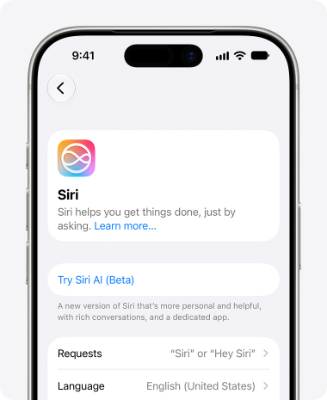
How to turn on Siri AI and join the waitlist
Follow these steps to enable Siri AI and join the waitlist:
- Open the Settings app on your iPhone
- Scroll down and select Siri
- Tap Try Siri AI (Beta)
- Follow the prompts, which consist of picking a voice, completing voice enrollment, and reviewing privacy settings
- Once you’ve completed those steps, you’ll be added to the waitlist
There isn’t a clear estimate of how long you’ll have to wait before gaining access to Siri AI. Some users report getting in a few hours, others state several days.